

The Chinese Invitation
For one, I acknowledge that the posts in this blog might not be widely read, especially since the link to the posts and archives are hidden somewhere in the site map for this blog (If you need more than one click, it's hidden).But I'm posting this anyway for the benefit of anyone who:
- is planning a wedding
- is half Chinese
- doesn't really know how to type or print anything in Chinese
- can read and understand a bit of Chinese
- are doing their own invitations, and
- want a Chinese invite insert to please their Chinese friends and relatives
How To Do Your Own Chinese Invite Insert
 Our Chinese Invite Insert! :)
Tools used:
- Something to copy from
- a base invitation template to copy from. In our case, we compared and copied from two different invitations that we received before. At first, I couldn't understand half of what I was writing...I even copied the date of the wedding and the names of the couple! But eventually I got the hang of it...and it was because of item # 2 below
- An easy to use Chinese word processor
- Hooray for Google, and NJ Star Chinese Word Processor!
It was google that led me to this nifty word processor, which can type characters based on ping yin and on the number of strokes of the Chinese rootword. If you highlight a certain text, the English translation is shown, so it gets quite easy to understand what it is you're typing. Best of all, it's shareware! Since I was just going to use just this once, it was perfect.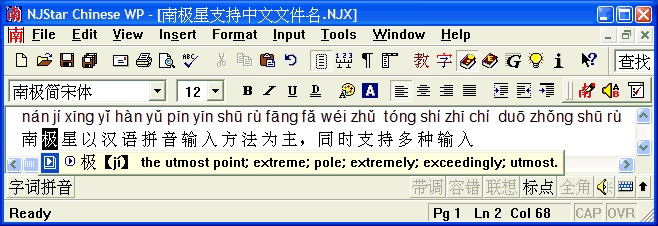
Pros: Easy to use. Free trial for 30 days. Instant Chinese-English translations. Characters can be typed using Ping-yin or the Chinese radical look up table. Displays characters in traditional and simplified Chinese. Can print vertically. If you choose to buy the program, you get various fonts included, plus other cool features like handwriting recognition, text-to-speech, etc. The free trial does not contain these features, and includes only the basic system font.
Cons: For some weird reason that may be related to my PC being an XP, I can't launch the application more than once. Meaning, once I had NJ Star installed, I can open it, type, save, print, etc. But once I close the application, I can't open it again. I have to uninstall and install the application every time I tried to use it. - A translator
- The most helpful of all: babelfish.altavista.com.

Thank you for the Hitchhiker's Guide to the Galaxy series and the babel fish that started it. And thank you that altavista has Babel Fish translator, where you can translate word and phrases, and copy and paste Chinese text from NJStar/Word to the browser and vice versa. - Google of course, which led me to the following sites:
To get equivalent Chinese names:
Mandarin Tools
Lechinois.com
Western-Chinese Lunar Calendar converters:
Mandarin Tools
ACADEMIA Sinica Computing Centre's tool - A proofreader
- In our case, this was my dad, who read and suggested and corrected as he saw fit.
And that's it. You're on your way.
posted by xieurx @ 6:20 AM


0 Comments:
Post a Comment
<< Home